Skip to content
BI4Dynamics vs. Building BI Yourself
Compare BI4Dynamics with custom Power BI builds, enterprise data platforms, legacy OLAP tools, finance-only planning platforms, and BI consulting firms. See the trade-offs before you build, buy, or outsource your Dynamics analytics.
worldwide
out of the box
live dashboard
for Dynamics ERP
The Real Cost Is Not the License. It Is the Build.
Most Dynamics analytics projects look cheaper at the start than they are after modeling, maintenance, upgrades, reconciliation, and report changes.
Custom reports often fail when the Dynamics data structure changes.
Teams spend budget keeping reports alive. BI4Dynamics reduces upgrade risk with a prebuilt data warehouse and semantic layer designed for Dynamics.
Enterprise data platforms and custom BI projects start with infrastructure, not Dynamics business content.
Dynamics ERP has hundreds of tables and business rules. BI4Dynamics starts with 3,000 KPIs already mapped.
Every new report request becomes a queue for IT, BI, or external consultants.
Custom builds need DAX developers, data engineers, and Dynamics experts. BI4Dynamics gives business users a prepared model they use in Power BI and Excel.
The first build is not the end. It is the start of maintenance.
New fields, new entities, new reports, new upgrades, and new users keep adding cost. BI4Dynamics is a product, not an open-ended build project.
NAV to BC and AX to D365 migrations often break historical reporting continuity.
BI4Dynamics helps bridge historical NAV and AX data with current Dynamics data. Your trend analysis does not need to restart after migration.
Finance loses trust when dashboards, Excel files, and ERP reports do not match.
A prebuilt data warehouse with a governed semantic layer gives teams a single reporting foundation. One model across departments, reports, and users.
Select the Option You Are Considering
Each path has a place. The question is which one fits your Dynamics reporting problem, timeline, budget, and internal resources.
- 3,000 prebuilt KPIs and 150 Dynamics dashboards
- Purpose-built for D365 Finance, Business Central, NAV, and AX
- Business users work in Power BI and Excel from a prepared semantic model
- Designed to complement Microsoft data infrastructure
- Shorter path from ERP data to usable reports
- ERP logic, KPIs, and dashboards still need to be built
- Needs skilled data engineers and Dynamics data knowledge
- Time to value depends on build scope and internal capacity
- Finance and operations users do not get ready ERP analytics by default
- Governance still needs business definitions and report logic
- Prebuilt Dynamics data warehouse and semantic layer
- Ready KPIs across finance, sales, purchasing, inventory, and receivables
- Designed for Dynamics upgrades and model changes
- Business users analyze in Power BI and Excel
- Lower dependency on individual developers
- Everything must be modeled, tested, documented, and maintained
- Time to value depends on developer availability
- Dynamics upgrades create maintenance work
- Documentation often becomes outdated fast
- Business definitions can drift across reports
- Power BI-native dashboards and semantic model
- Focused on Microsoft Dynamics analytics
- Works across D365 Finance, BC, NAV, and AX
- Ready dashboards for finance and operational reporting
- Designed for current Dynamics reporting expectations
- Often more Excel-centric
- Can require tool-specific knowledge
- May not fit modern self-service Power BI workflows as well
- Operational analytics depth varies by setup
- May create transition questions during modernization
- Finance, sales, purchasing, inventory, receivables, payables, and more
- Operational KPIs for sales, supply chain, and stock analysis
- Power BI and Excel access from one semantic model
- Designed for ERP analytics, not only planning
- Fits C-level, finance, sales, and BI teams
- Best fit is budgeting, forecasting, and planning workflows
- Operational analytics often needs extra modeling
- Not usually the best primary layer for sales and inventory analysis
- Power BI experience depends on integration approach
- Wider ERP reporting may still need another BI layer
- Prebuilt analytics foundation
- Partners reduce project delivery risk by starting from proven content
- Business users get a maintained product, not custom code only
- 1,000+ Dynamics implementations
- Lower long-term dependency on individual consultants
- Every report and change can become billable work
- Knowledge often sits with a few people
- Longer timelines if everything starts from scratch
- Maintenance depends on ongoing engagement
- The result varies by consultant skill
15 Capabilities. Compare the Trade-Offs.
Use this table for deeper evaluation after you narrow the options above.
← Scroll to see all columns →
| Capability | BI4Dynamics | Enterprise Data Platform | Bespoke BI Build | Legacy OLAP Reporting Tool | Cloud FP&A Platform / CPM |
|---|---|---|---|---|---|
| Speed & Time to Value | |||||
| Time to first live dashboard | ✓ Days | 2-6 months | 6-18 months | Weeks-months | Weeks-months |
| Prebuilt KPIs out of the box | ✓ 3,000 | ✗ None | ✗ None | ~ Limited | ~ Finance only |
| Prebuilt dashboards | ✓ 150 | ✗ None | ✗ None | ~ Limited | ~ Finance only |
| Scope & ERP Coverage | |||||
| D365 Finance & Operations | ✓ Full coverage | ~ Requires build | ~ Requires build | ✓ | ~ Limited |
| Business Central / NAV | ✓ Full coverage | ~ Requires build | ~ Requires build | ✓ | ✗ |
| Historical NAV/AX migration bridge | ✓ Native | ✗ | ✗ | ~ Partial | ✗ |
| Multi-company consolidation | ✓ | ~ Custom build | ~ Custom build | ~ Limited | ✓ |
| Operational analytics | ✓ All modules | ~ Requires build | ~ Requires build | ~ Limited | ✗ Finance only |
| Architecture & Maintenance | |||||
| Upgrade-resilient | ✓ By design | ~ Your responsibility | ✗ Breaks regularly | ~ Mixed | ~ Mixed |
| Prebuilt star-schema data warehouse | ✓ | ✗ Build it yourself | ✗ Build it yourself | ✓ | ~ Partial |
| Power BI-native architecture | ✓ | ✓ | ✓ | ✗ Excel-centric | ~ Limited |
| Microsoft data platform compatible | ✓ | - | ✓ | ~ Partial | ~ Partial |
| Business Value & Buyer Fit | |||||
| Finance team self-service | ✓ Yes | ✗ Requires engineers | ✗ Requires developers | ~ Partial | ~ Finance only |
| Predictable subscription pricing | ✓ | ✗ Capacity-based | ✗ Project + maintenance | ~ Mixed | ~ Mixed |
| Proven Dynamics deployments | ✓ 1,000+ | ~ Platform | ~ Per consultant | ✓ Many | ✓ Many |
✓ = Full capability ~ = Partial or requires configuration ✗ = Not available or not primary use case
What You Get With BI4Dynamics
A complete Dynamics analytics foundation, not another empty reporting project.
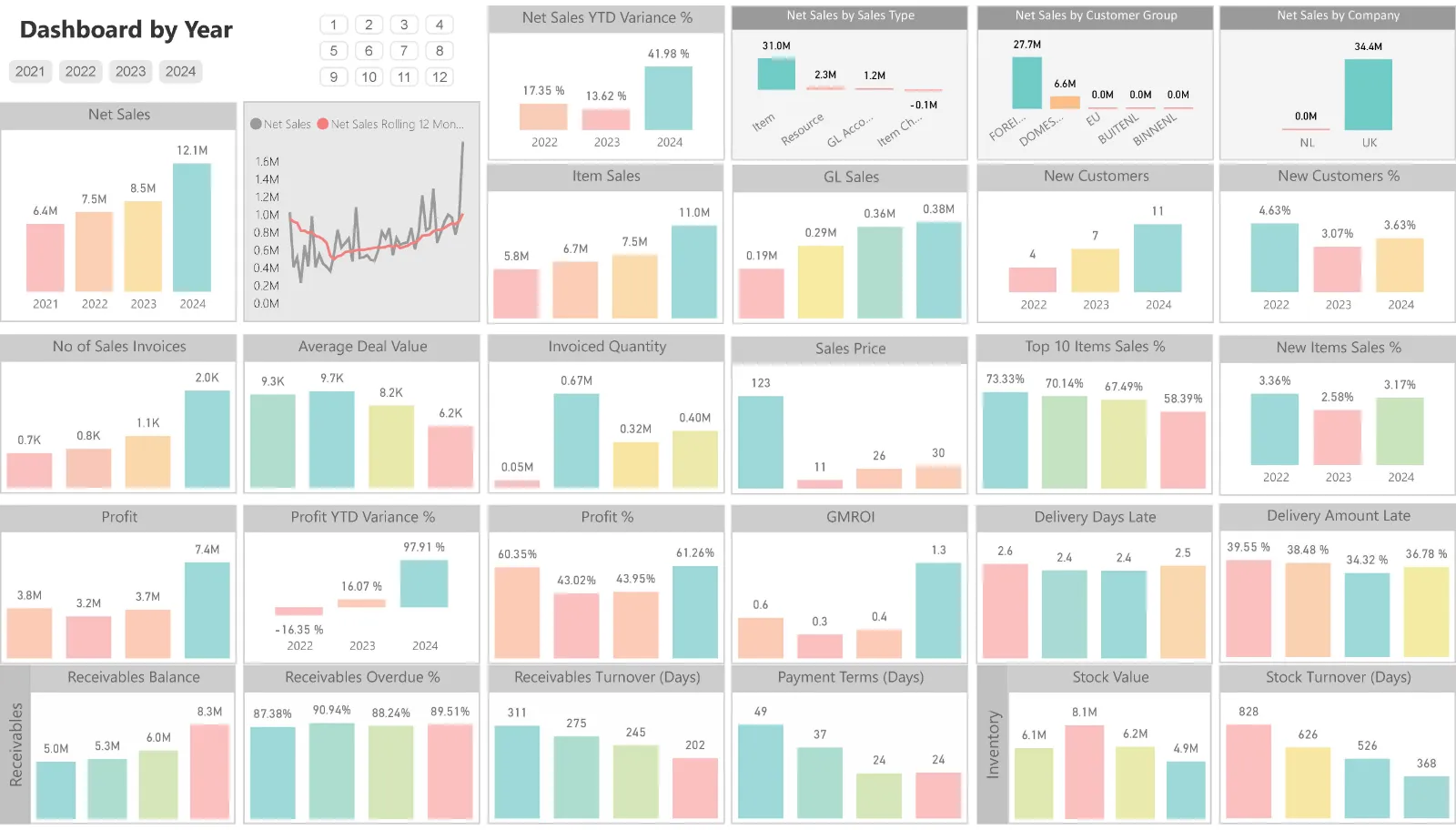
Prebuilt Dynamics data warehouse
ERP data lands in a structured model built for Dynamics 365 Finance & Operations, Business Central, AX, and NAV.
KPIs out of the box
Start with finance, sales, inventory, purchasing, payables, receivables, and retail measures.
Power BI dashboards
Give teams ready reports instead of blank canvas Power BI development.
One model for Power BI and Excel
Business users browse governed Dynamics data through a semantic layer with roles, permissions, DAX calculations, hierarchies, and translations.
Validation before users lose confidence
BI4Dynamics supports data validation and quality checks so finance and IT stop arguing about which report is correct.
Not months
Use a proven Dynamics model first, then customize what the business needs.
Implemented projects
Use proof from real Dynamics deployments, not a prototype built for a sales deck.
Proven Results Across 1,000+ Dynamics Deployments
Before BI4Dynamics, a full-time resource was dedicated to ETL and data prep, producing only a small number of monthly reports. After deployment, the team moved from preparation work to dashboard value.
In less than a year, BI4Dynamics has already paid for itself. The ROI was clear after go-live.
Previously, we spent 10 to 15 hours per month on manual reporting preparation. With BI4Dynamics, we achieved daily refresh and near-instant report generation.
BI4Dynamics opens reporting to mid-level management and non-technical users. It relieves the pressure and time burden from IT.
Is BI4Dynamics Right for You?
This is not for every company. It is for Dynamics teams that need governed ERP analytics faster.
- You run Microsoft Dynamics ERP
- You need analytics live in days, not months
- Finance needs self-service without constant IT dependency
- You are migrating from NAV or AX and need historical continuity
- Your custom BI setup breaks or slows down after changes
- You need finance, sales, inventory, and purchasing in one model
- You do not use Microsoft Dynamics as your ERP
- Your main need is budgeting write-back and FP&A planning
- You need a broader data platform for many non-ERP systems
- You have a large internal BI team that wants full ownership of every model
Recognize your situation in the right-fit column? Start with a discovery call and review your Dynamics setup.
The Questions Every Buyer Asks
No hidden accordion. The answers stay visible because buyers should not have to hunt for basic clarity.
Does BI4Dynamics replace Power BI or work alongside it?
BI4Dynamics works alongside Power BI. Power BI is the visualization engine. BI4Dynamics provides the prepared Dynamics data warehouse and semantic layer underneath it.
Does BI4Dynamics replace enterprise data platforms?
No. BI4Dynamics is designed to complement Microsoft data infrastructure. Enterprise data platforms provide infrastructure. BI4Dynamics provides Dynamics ERP business content, KPIs, and reporting logic.
How long does deployment take?
Most customers start with live dashboards within days of installation. Exact timelines depend on environment complexity, data volume, number of companies, and required customization.
What happens when Dynamics updates?
BI4Dynamics is designed to reduce upgrade-related reporting disruption through its prebuilt data warehouse and semantic model. This is one of the main differences from fragile custom report layers.
Can BI4Dynamics handle NAV or AX history?
Yes. BI4Dynamics supports legacy NAV and AX scenarios and helps combine historical ERP data with current Dynamics reporting needs.
Can BI4Dynamics cover finance and operational analytics?
Yes. BI4Dynamics includes finance, receivables, payables, sales, purchasing, inventory, retail, and operational reporting areas, depending on your Dynamics setup.
See What BI4Dynamics Looks Like on Your Dynamics Data
Start with a discovery call. We review your Dynamics setup, reporting pain, data structure, and business priorities before recommending the next step.